- Home
- Learn Linux
- Learn Electronics
- Raspberry Pi
- Programming
- Projects
- LPI certification
- News & Reviews

If you are new to 3D printing and looking for the perfect entry point into CAD design, Tinkercad is an excellent, browser-based tool that makes creating models both accessible and intuitive. While professional-grade software like Blender excels at artistic sculpting, Tinkercad focuses on precision and structured Computer-Aided Design (CAD), making it ideal for functional projects. In this tutorial, we will get you up and running by designing a simple brick wall tailored for a G-Scale model railway layout. We’ll walk through the basics of how to place, size, and group objects, while also discussing the platform's practical limits—such as design size constraints—and when you might eventually need to consider more advanced CAD software.
In this tutorial you will learn how to create a first 3D model in TinkerCAD.
TinkerCAD is an online 3D design tool. It works well in both Firefox and Chrome (Chromium) on Linux. It is closer to a professional Computer Aided Design tool compared to Blender (which is more of a modelling tool).
TinkerCAD is very easy to use, and in my opinion one of the easiest to get started with. It is still possible to create some complex designs. TinkerCAD has some restrictions in what it can create. In particular there is a restriction in the size of model that can be created, restricted approximately to the same size as most 3D printers. If you need to create models larger then those then may need to be scaled down, subdivided into smaller models or use a more professional tool.
This is a simple video of getting started in TinkerCAD and creating a simple wall to 3D print for a G-Scale model railway.
Eventually this can involve into a more complex building such as the one shown below. This is a G-Scale Model Railway Weigh Bridge Office, which has been created in TinkerCAD.
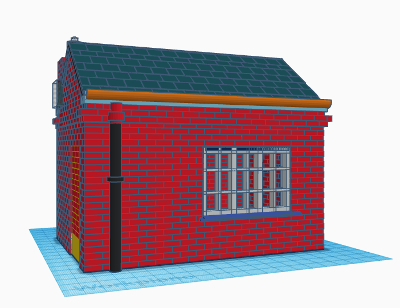
The latest version of the building is now available. Information on how this was created is available at:
There are more guides to creating 3D models and use of a 3D printer at Penguintutor 3D design and 3D print projects
To see future updates please:
Subscribe to the PenguinTutor YouTube Channel
Please view the copyright information regarding use of the circuits.


