- Home
- Learn Linux
- Learn Electronics
- Raspberry Pi
- Programming
- Projects
- LPI certification
- News & Reviews

If you are ready to graduate from lightweight plastic rovers and build a serious, heavy-duty hardware platform, the T200 Raspberry Pi Tank Robot is exactly what you need. While it is a bit more of an investment, this sturdy caterpillar-tracked chassis provides an incredible foundation for learning advanced robotics. In this project, we step up the power by using a 12V battery pack to drive dual motors via an L298N motor controller, safely stepping down the voltage with a buck converter to run the Raspberry Pi simultaneously from the same power source. Complete with custom-designed, 3D-printed mounting brackets to keep your electronics perfectly organized, this build will teach you how to handle higher voltages and write Python gpiozero scripts to command your tank using a keyboard or wireless gamepad.
This is a little more expensive than the other robots I've featured, but gives a sturdy platform useful for those wanting to learn about using the Raspberry Pi to control a robot.
The chassis is a tank based chassis with caterpillar track wheels. It has two 12V motors and includes LEDs at the front of the chassis.
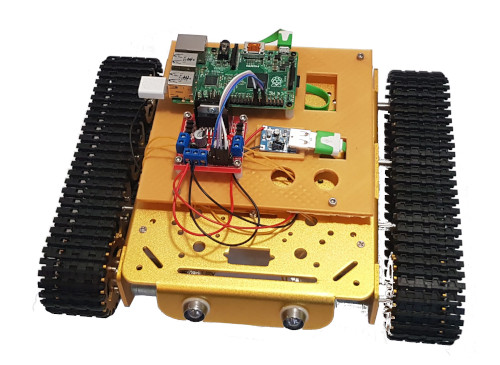
I've created my own 3D printed mounting brackets for the Raspberry Pi and motor controller and for the battery. These have been printed using a metalic gold PLA which matches the chassis quite well. If you don't have access to a 3D printer then these are not neccessary but you may need to position the items differently or use cable ties if attaching directly to the chassis.
You need to provide your own battery. I used a 12V battery pack typically used for remote control cars etc.
The video then explains about the motor controller which is based around the L298N motor controller and a buck convertor to power the Raspberry Pi from the 12V battery.
The code to control the robot is return in Python using gpio zero. It uses the keyboard presses to control the robot, but that can be controlled using qjoypad and a wireless controller.
Links to the relevant files are included below:
These links provide more information about the robot and other related information
To see future updates please:
Subscribe to the PenguinTutor YouTube Channel
Please view the copyright information regarding use of the circuits.


